AI Detector MCP Server
Let your AI assistant check text and images for AI generation by itself — no pasting results back and forth. Hosted, nothing to install, connected with one URL.
https://www.wasitaigenerated.com/api/mcpConnecting takes one command
Two ways in, depending on what your client supports. Both reach the same server.
With OAuth
The client discovers the rest from the endpoint and opens a browser for you to approve. Nothing to copy, and you can see exactly what you are granting.
claude mcp add --transport http \
  wasitaigenerated https://www.wasitaigenerated.com/api/mcp
With an API key
For clients that take a static header, or for scripts. Keys start with wai_ and come from your dashboard.
claude mcp add --transport http \
  wasitaigenerated https://www.wasitaigenerated.com/api/mcp \
  --header "Authorization: Bearer $WAI_API_KEY"
Adding it in Claude
Same three steps whether you use claude.ai or Claude Code.
- 1
Point Claude at the server
On claude.ai, open Settings → Connectors → Add → Add custom connector, give it a name and paste the URL.
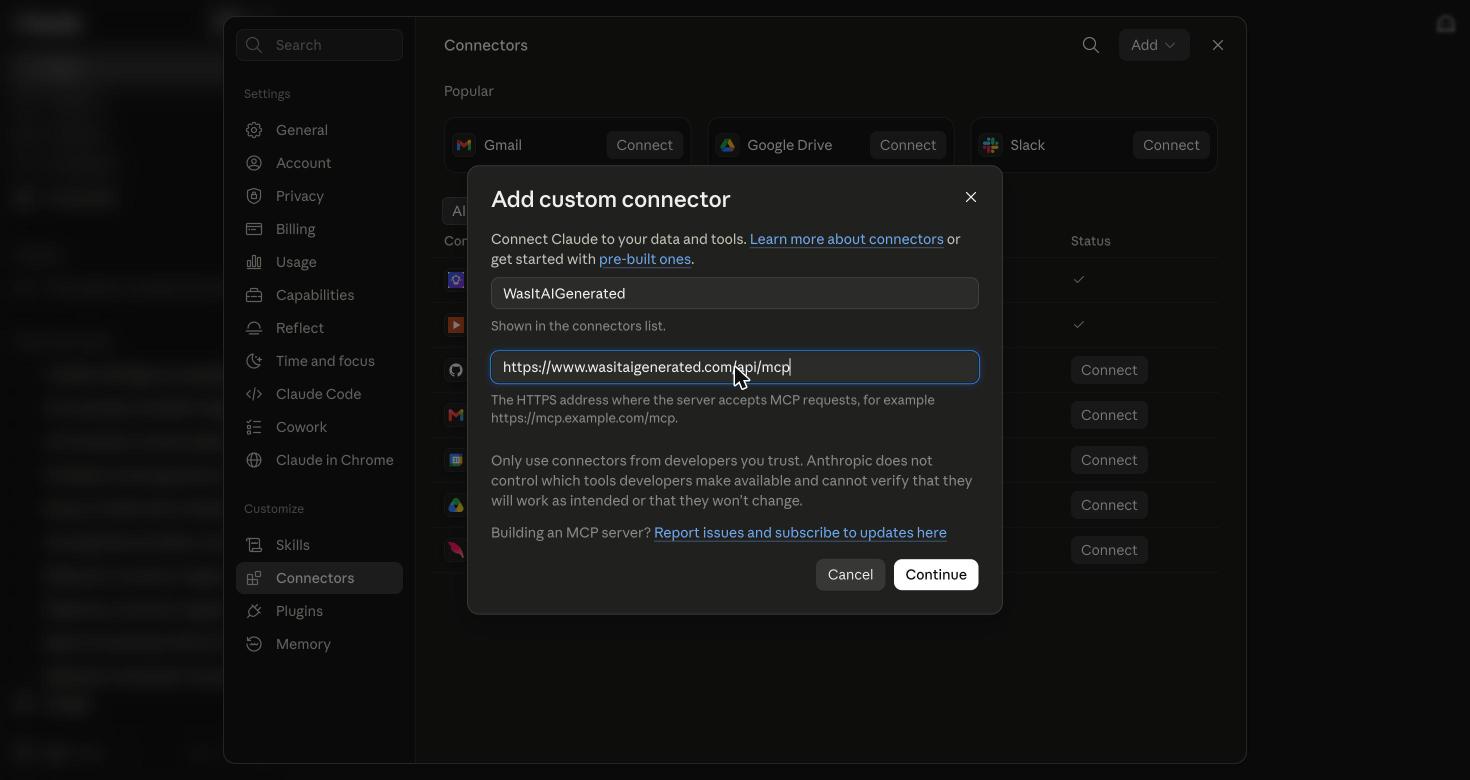
In Claude Code, one command does the same thing:
claude mcp add --transport http \ wasitaigenerated https://www.wasitaigenerated.com/api/mcp - 2
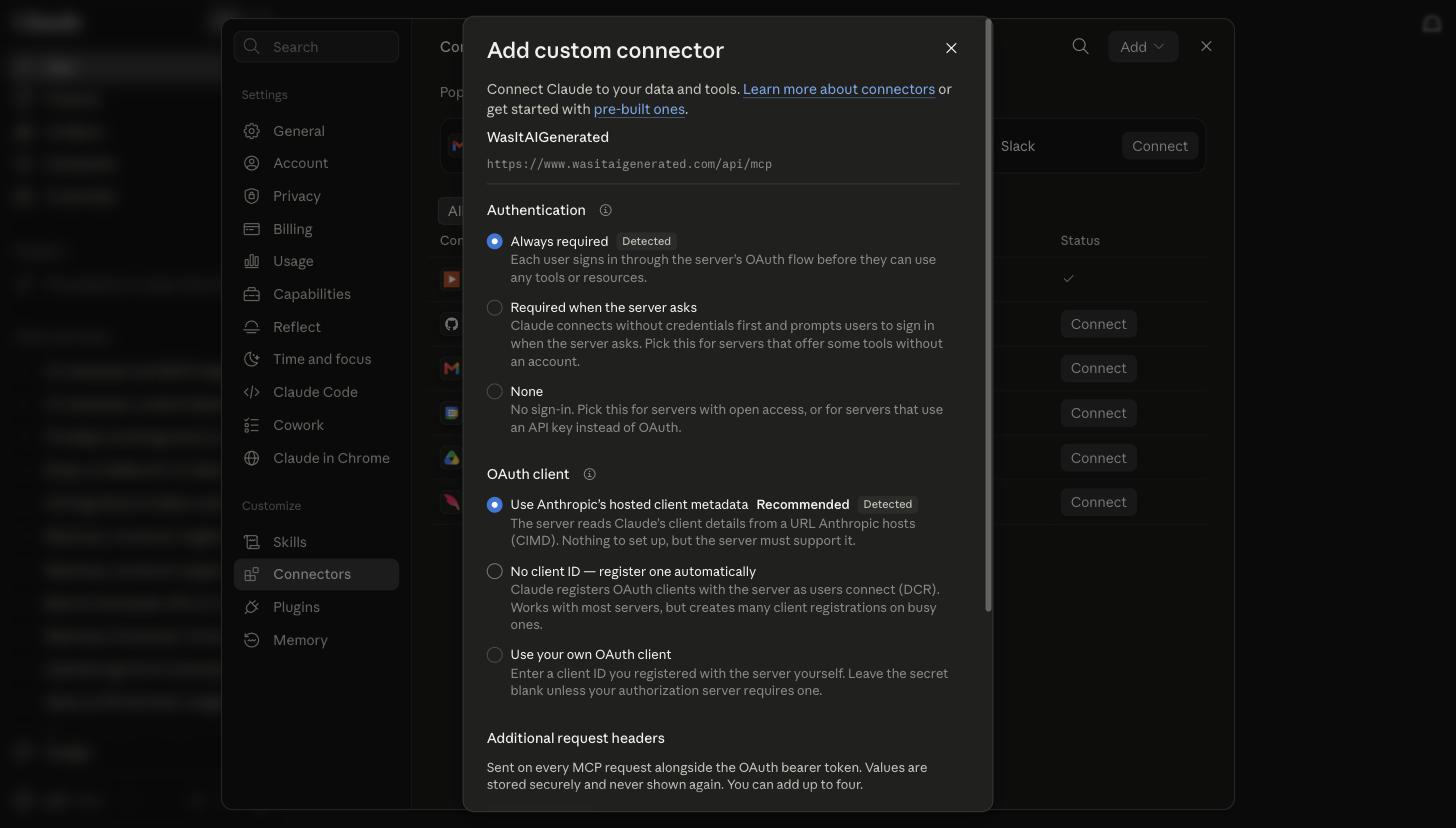
Claude works out the rest
Nothing to configure by hand. The server publishes its own OAuth metadata, so the client reads off that sign-in is required and how to identify itself, and fills the settings in for you.
- 3
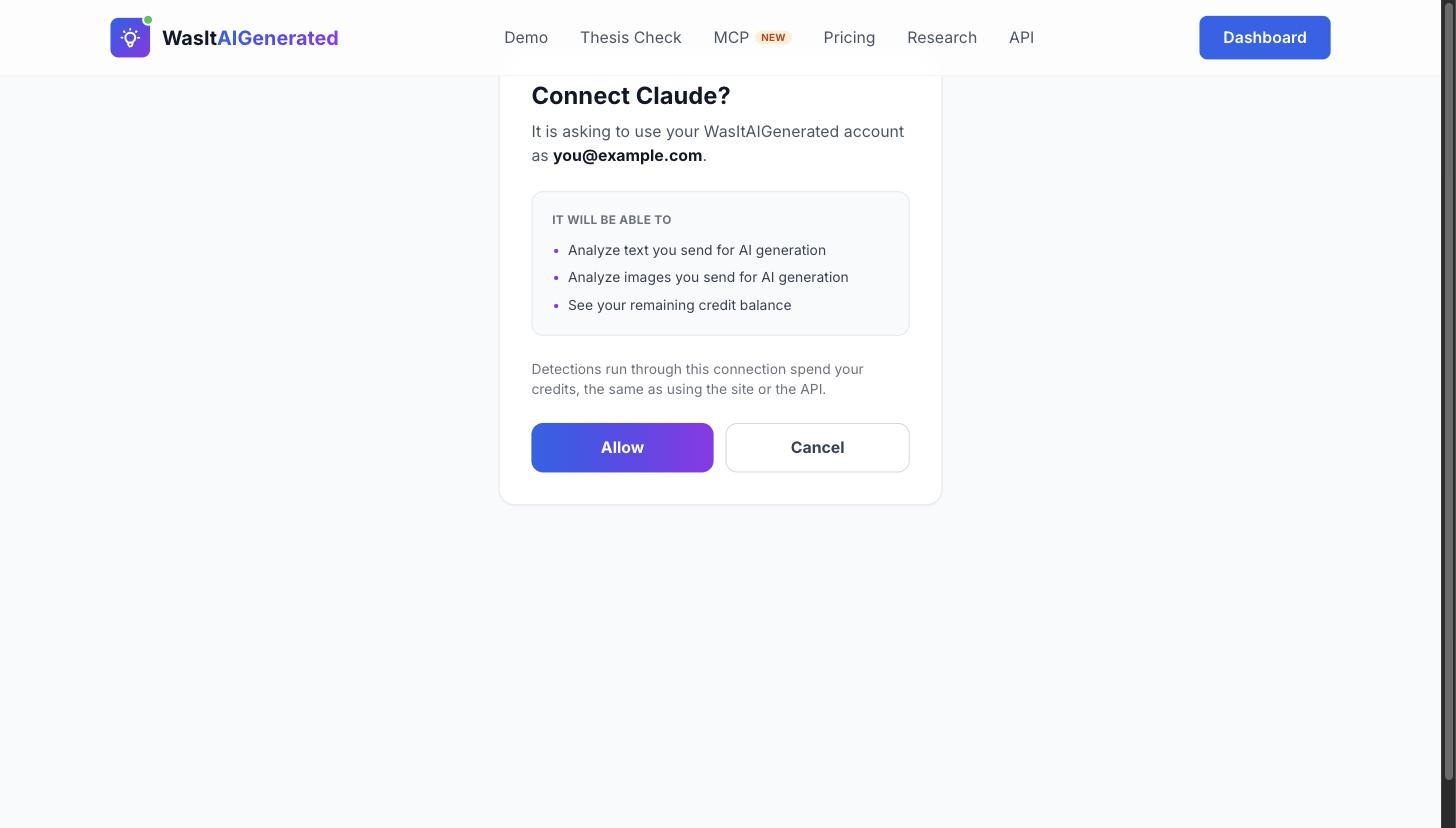
Approve the connection
A browser opens and asks you to sign in, then shows exactly what the connection will be able to do. Nothing is granted until you press Allow.
- 4
Ask it to check something
That is the whole setup. Paste a passage and ask whether it looks AI-generated — the assistant calls the detector itself and reports the score, with the sentences that drove it.
What it looks like in use
You do not call the tools yourself. You describe what you want checked, and the assistant decides to call them.
You ask
“Write me a short explainer on sleep hygiene — then run it through the detector and tell me what it scores.”
It writes the text, calls detect_ai_text, and gets back
AI-generated — AI score 99.8/100 (108 words, 108 credits, model tropa-3)
Overall AI score: 99.8% (7/7 sentences flagged individually)

7 of 7 sentences scored as AI. Highest:
  100% — "Sleep hygiene means the habits and surroundings that help
          you sleep well on a regular basis."
  100% — "It is not about making sleep perfect or following strict rules."
  100% — "The aim is to give your body clear signals about when to be
          awake and when to rest."

This is a probabilistic estimate, not proof of authorship.
Real output from this server, on text a frontier model had just written. Asking an assistant to check its own work is the quickest way to see the detector behave — and a fair test, because the answer is known in advance.
Other things worth asking for
- • “Check this application letter I received and tell me which passages look machine-written.”
- • “Go through these five product reviews and flag any that look generated.”
- • “Does this image carry content credentials, and do they say it was AI-generated?”
- • “How many credits do I have left before we start?”
One caution worth repeating: a high score is a reason to look closer, never a verdict about a person. An assistant reporting a number needs that caveat as much as a person reading one.
Three tools
Each one states its own price, so an assistant knows what a call costs before it makes it.
detect_ai_text1 credit per wordScores a passage and returns a verdict plus a sentence-level breakdown, so the assistant can point at which parts drive the result.
detect_ai_image300 creditsChecks an image by URL or base64 and reads any C2PA content credentials signed into the file — cryptographic provenance, not just a pixel score.
get_credit_balancefreeReads the remaining balance, so an agent can check the budget before working through a batch.
What a connection can and cannot do
Approving the connection grants exactly three things, and the consent screen lists them before you agree: analyze text you send, analyze images you send, and read your credit balance. A client that only asks for one of those only gets that one.
Nothing else in your account is reachable — not your detection history, not your billing, not your saved reports. Access tokens are short-lived and bound to this server specifically, so one cannot be replayed against anything else.
Worth saying plainly: results are a probabilistic estimate, not proof of authorship. That holds whether a person reads the score or an assistant does. If an agent reports a high number, treat it as a reason to look closer — see our model documentation for the error rates behind it.
Connect it now
Free credits to start. Full technical reference in the docs.
MCP Server: FAQ
What is an MCP server?
The Model Context Protocol is an open standard for connecting AI assistants to outside tools. An MCP server exposes a set of tools the assistant can call on its own. Ours exposes AI detection, so an assistant can check a document itself instead of asking you to paste results back and forth.
Do I need to install anything?
No. The server is hosted at wasitaigenerated.com/api/mcp. You add that URL in your client and approve the connection — there is no package to install and no version to keep up to date.
How does authentication work?
Clients that support OAuth discover everything from the endpoint and open a browser for you to approve the connection, following the OAuth 2.1 flow the MCP specification defines. Clients that take a static header can send a wai_ API key from your dashboard instead.
Does it cost credits?
Yes, the same as the REST API: 1 credit per word of text, and 300 credits per image. Checking a balance is free. Every tool states its price in its own description, so the assistant knows the cost before it calls — worth remembering before pointing an agent at a long document or a folder of images.
Which clients work with it?
Any MCP client that supports remote servers over HTTP. That includes Claude Code and Claude Desktop; other clients vary in whether they handle the OAuth flow or expect a static header, and both are supported here.
Can the assistant see my other data?
No. The connection grants exactly three capabilities, listed on the consent screen when you approve it: analyze text you send, analyze images you send, and read your credit balance. Nothing else in your account is reachable through it.